Page 888 - techequipmentscatalogue2016
P. 888
AX
METROTECH
vLocML2
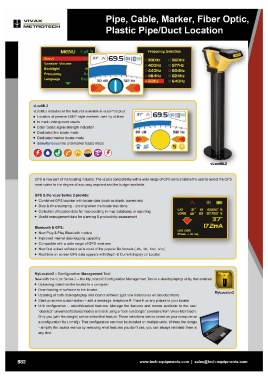
vLocML2 includes all the features available in vLocPr02 plus:
• Location of passive EMS@style markers used by utilities
• to mark underground assets
• Color coded signal strength indication
• Dedicated line locate mode
• Dedicated marker locate mode
• Simultaneous line and marker locate mode
GPS is now part of the locating industry. The vLoc's compatibility with a wide range of GPS units enables the user to select the GPS
most suited to the degree of accuracy required and the budget available.
GPS & the vLoc Series 2 provide:
• Combined GPS location with locate data (such as depth , current etc)
• Date & time stamping - proving when the locate was done
• Collection of location data for incorporating in map databases or reporting
• Useful management data for planning & productivity assessment
Bluetooth & GPS:
• New Plug & Play Bluetooth module
• Improved internal data-logging capability
• Compatible with a wide range of GPS receivers
• New fast upload software suits most of the popular file formats (.xls, .txt, .kml , .shp)
• Real time on screen GPS data appears with Depth & Current display on Locator
MyLocator2 - Configuration Management Tool
New with the vLoc Series 2 - the MyLocator2 Configuration Management Tool is a desktop/laptop utility that enables:
• Uploading data from the locator to a computer
• Downloading of software to the locator MyLocator2
• Updating of both desktop/laptop and locator software (get new features as we develop them)
• Start up screen customization - add a message, telephone # , Plant #, or any picture to your locator
• Unit configuration - select/deselect features. Manage the features and modes available to the user,
"deselect" unwanted features/modes and lock using a "lock-out dongle" (available from Vivax-Metrotech).
Only you (with the dongle) can re-select that feature. These selections can be saved on your computer as
a configuration file (.vmcfg). That configuration can then be installed on multiple units. Without the dongle
- simplify the locator menus by removing what features you don't use, you can always reinstate them at
any time.
882 www.tech-equipments.comlsales@tech-equipments.com
METROTECH
vLocML2
vLocML2 includes all the features available in vLocPr02 plus:
• Location of passive EMS@style markers used by utilities
• to mark underground assets
• Color coded signal strength indication
• Dedicated line locate mode
• Dedicated marker locate mode
• Simultaneous line and marker locate mode
GPS is now part of the locating industry. The vLoc's compatibility with a wide range of GPS units enables the user to select the GPS
most suited to the degree of accuracy required and the budget available.
GPS & the vLoc Series 2 provide:
• Combined GPS location with locate data (such as depth , current etc)
• Date & time stamping - proving when the locate was done
• Collection of location data for incorporating in map databases or reporting
• Useful management data for planning & productivity assessment
Bluetooth & GPS:
• New Plug & Play Bluetooth module
• Improved internal data-logging capability
• Compatible with a wide range of GPS receivers
• New fast upload software suits most of the popular file formats (.xls, .txt, .kml , .shp)
• Real time on screen GPS data appears with Depth & Current display on Locator
MyLocator2 - Configuration Management Tool
New with the vLoc Series 2 - the MyLocator2 Configuration Management Tool is a desktop/laptop utility that enables:
• Uploading data from the locator to a computer
• Downloading of software to the locator MyLocator2
• Updating of both desktop/laptop and locator software (get new features as we develop them)
• Start up screen customization - add a message, telephone # , Plant #, or any picture to your locator
• Unit configuration - select/deselect features. Manage the features and modes available to the user,
"deselect" unwanted features/modes and lock using a "lock-out dongle" (available from Vivax-Metrotech).
Only you (with the dongle) can re-select that feature. These selections can be saved on your computer as
a configuration file (.vmcfg). That configuration can then be installed on multiple units. Without the dongle
- simplify the locator menus by removing what features you don't use, you can always reinstate them at
any time.
882 www.tech-equipments.comlsales@tech-equipments.com